Waiver Overview
- Waivers process daily around 3 am EST
- Any player dropped by an owner will be placed on waivers for at least 24 hours
- Once that time has passed, they either clear waivers, meaning no one has claimed them, or they enter the free-agent pool
- The unclaimed players can now be picked up on a first-come, first-serve basis, without affecting your team's waiver position
Add a Player on the ESPN Fantasy App
- Go under the Players tab on the My Team page
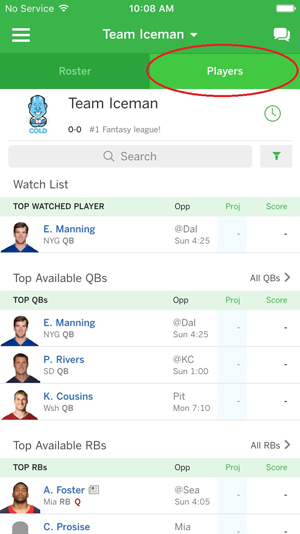
- Search for a specific player or search by position
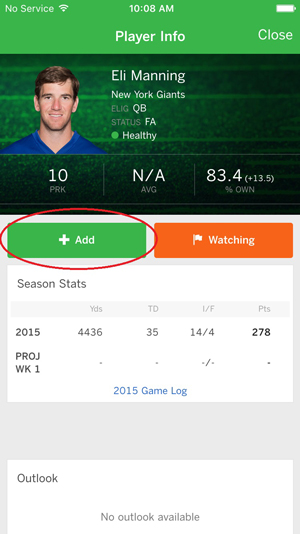
- On the player card, click the green "Add" button. You will most likely have to drop one of your players to open up a roster spot
Add a Player on the Web
- Click on the My Team tab in the clubhouse
- Hover over Add Players right below the My Team tab
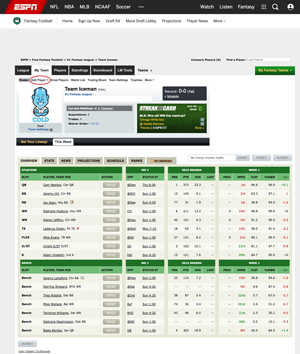
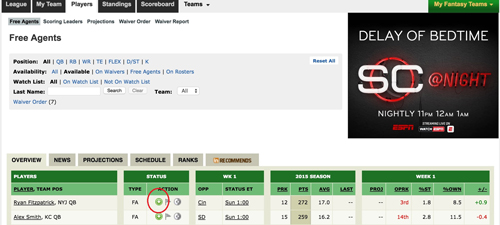
- You can select a specific position or all positions to choose from
- Select a player to claim off waivers. You will most likely have to drop one of your players to open up a roster spot
In the event that multiple claims are all submitted for a player, the claim will be awarded to the team with the most favorable waiver position, or in other words closest to "1". Once a team is awarded a claim they get moved to the last possible position on the waiver order and everyone else moves up a slot, so if you didn't win your claim at least you're a one rung further up the ladder for next time.
Note: Waivers won't reset in your league during the playoffs if they are based off of inverse order of standings. The playoff teams are already set so the standings won't change.